Thursday, September 8, 2016


Tuesday, October 22, 2013
Blast Wind In-Depth: Hardcore Gaming 101

Everyone's favorite obsessive retro site recently published my review/analysis of Technosoft's Blast Wind. You can check it out here.
Some highlights:
- Blast Wind's arcade origins and the mysterious Inazuma Saber.
- Working Design's plans for Technosoft's Saturn library.
- Why Blast Wind never interested Thunder Force fans.
- How to play Blast Wind "properly".
Don't forget to listen to Tsukumo Hyakutaro's soundtrack while you read:


Thursday, October 10, 2013
Rob Lord and Mark Bandola's Saturn-Exclusive Wipeout Tracks

I'm a big fan of the Wipeout franchise. The gameplay is addictive and the music kills - especially Tim "CoLD SToRAGE" Wright's work. One interesting bit of music-related trivia is that licensing issues forced the Sega Saturn version of the first Wipeout game to drop several of the tracks from the Playstation original. These tracks then got replaced with three Saturn-exclusive exclusive pieces composed by Mark Bandola of The Lucy Show and veteran jack-of-all-trades Rob Lord.
The exclusive tracks are on YouTube, but YouTube tracks aren't real music. Am I right? I couldn't find any "real" links online, so I just decided to rip them from my own copy. Here they are, in lossless FLAC and 320kb MP3. The host is MEGA. If the links go down, hit me up. Otherwise, enjoy!
Warning: AGwolf2097 from YouTube has pointed out that Planet 9 has two loud pops in the left channel - one at 1:00 and another at 3:24. He's remastered his versions on YouTube to remove these artifacts, and I've uploaded his fixed MP3 below. That said, the FLAC lossless version will remain faithful to the source audio (blemishes and all) and will not be updated.
FLAC, ZIP (111 MB)
MP3, ZIP (36 MB)
Planet 9 (AGwolf2097 Remaster), MP3, (9MB)
 |
| Planet 9 @ 1m00s |
Planet 9:
Gotta dig the jam on this one. Dives right into a rolling breakbeat, then layers in some crowd cheers for that future hovercraft racing vibe. Sticks in a tight box for the duration of the track - upbeat, energetic, and just plain groovy.
Brickbat:
This track kicks off with a retro Detroit Techno sound, snaps into a hip sampled guitar riff, then gutters its way to the end by remixing and recycling those two natty elements.
Poison:
Chill-out track - mellow jamming on the synthesizer provides an abstract lead-in to a earworm hook. Bumping bassline throughout, gets angry before the sixty second minute mark. Another Detroit Techno sound, very similar to Streets of Sim City, if you've ever played that game.
Wednesday, May 29, 2013
Unpacking Saints of Virtue's .WRS Files
For better or worse, I'm probably one of the handful of people out there who takes any interest in Saints of Virtue. But hey, sometimes things just strike a chord. You can hit that HardcoreGaming101 link for all the information regarding the game. No need to repeat any of it - if by some miracle you're interested in this, then you don't need much background. This blog post is a short tutorial on how to open up the game's .WRS files and get at all of the assets - graphics, music, code, sound effects, you name it.

.WRS files are packaged, encrypted assets from Conitec's 3D Gamestudio engine, which Saints uses a very old version of (A3, to be exact). What's funny is that I used to make games in the A5 version of this engine as a kid, so imagine my surprise when my younger self recognized the bootscreen and filetypes Saints used. From that moment I started trying to hack my way in to get at the music and sounds, but no luck. There was some utility I can't remember - had Bread in the name - that was supposed to support .WRS files but it didn't work for these. I gave up, and for years I forgot about it.
Imagine my surprise when I did a random Google search on a whim and came up with this thread, detailing a working way to extract the game's assets. So here we go, what you'll need:

.WRS files are packaged, encrypted assets from Conitec's 3D Gamestudio engine, which Saints uses a very old version of (A3, to be exact). What's funny is that I used to make games in the A5 version of this engine as a kid, so imagine my surprise when my younger self recognized the bootscreen and filetypes Saints used. From that moment I started trying to hack my way in to get at the music and sounds, but no luck. There was some utility I can't remember - had Bread in the name - that was supposed to support .WRS files but it didn't work for these. I gave up, and for years I forgot about it.
Imagine my surprise when I did a random Google search on a whim and came up with this thread, detailing a working way to extract the game's assets. So here we go, what you'll need:
- A copy of the Saints of Virtue CD-ROM, or the downloadable version.
- QuickBMS. Latest version here, backup of 0.5.21 here, just in case.
- Extract script.
It's pretty simple. The specific steps:
- Run quickbms.exe.
- Select the saints_of_virtue_script.txt file you downloaded.
- Select your desired .WRS file.
- Select a folder to output to.
And we're done! QuickBMS will dump all the .PCX, .WAV, and .WDL files to your specified folder for your perusal.
As an extra Saints note, what few people talk about this game online often complain about how you jump so high you hit the ceiling. Or, if they play far enough, they might notice that the Sword Blaster fires cripplingly slow, even with the Rapid-Fire upgrade. Both of these issues are due to the uncapped framerate screwing up the game logic. Use the FRAPS 30FPS locking technique I described in my previous Streets post to fix these problems and enjoy Saints as it was intended to be played.


Running Streets of SimCity on Windows 7 x64
Okay, well, any fan of the game knows that 'running' is a relative term. The game was always prone to crashing, even back in the day on 32-bit Windows 95 and XP operating systems. But if you're reading this then you probably know that some hot Streets action is worth a few "unrecoverable errors", as the familiar in-game popup goes. I'm going to stamp a big sloppy "YMMV" on this technique, so don't bother asking for troubleshooting help or whatever when these steps don't work for you. My guess is that it will probably get the game running on most computers but your graphics card is going to be the deciding factor. For the record, my machine's vitals:


- Windows 7 Home Premium x64
- Mobile Intel 4 Series Express Chipset
- Pentium Dual-Core T4400 CPU @ 2.20 GHz
- 4 GB RAM
Obviously that's more than enough to run Streets. In fact, it's a damn sight too much. But more on that later. Next up, what you'll need to follow this tutorial:
- Hacked x64-compatible ENSETUP.EXE file.
- Pre-patched STREETS.EXE file.
- Copy of the original release on CD-ROM.
- FRAPS
The bare-bones simple version of the tutorial:
- Copy the Streets disc to your hard drive.
- Replace \setup\ensetup.exe with the hacked version above.
- Install the game using the new ensetup.exe.
- Reboot. (Important!)
- Replace the streets.exe file with the pre-patched version.
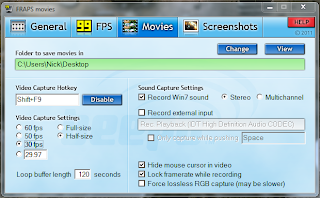
- Setup FRAPS to record a 30FPS video and lock the framerate while recording.
- Run the game with 256 color and "Run as administrator" compatibility options.
- Once in the game, hold down your Video Capture Hotkey button for several seconds until the FRAPS framerate indicator turns pink and indicates that it is in replay recording mode.
- Enjoy the nostalgia.
And now, the long version.
There's basically two problems that people run into when trying to play Streets on modern Windows XP and 7 systems. The first is the inability to execute a 16-bit installer on an 64-bit system. The second is that even on a 32-bit copy of Windows XP where you can get Streets to install, there's a problem where the uncapped framerate gets ridiculously high and causes problems - most visibly manifested in an AI glitch where the enemies constantly use the Hopper mod instead of actually driving around. This tutorial will fix both problems.
I created the hacked x64-compatbile ENSETUP.EXE file using the method outlined in this thread, which also summarizes the underlying problem quite nicely:
Indeed. If you try to run the SETUP.EXE file on the Streets CD-ROM, you'll get an error saying that "ENSETUP.EXE is missing or damaged." That's not entirely accurate, though. It's not missing or damaged, it's just a 16-bit installer! Try to execute that file from D:\setup and you'll get the following error message:From about 1995 to 1998 it was common practice for setup programs to launch using a Windows 3.1 16-bit loader stub. This gave installers the ability to package multiple binaries for Win16, Win32s, Win32, and Windows NT for Alpha CPUs. At the time it was a reasonable thing to do since all of these platforms could execute 16-Bit Windows 3.1 applications. Today...64-bit Microsoft Windows [don't] implement the ability to run 16-bit Windows 3.1 applications. The result is that there are many, many 32-bit programs that would run fine on these OSes, but are prevented from installing.

So what I did was run that setup file on an x86 Windows 7 machine and then pull the result ._MP file from the system Temp directory and rename it as an .EXE. Presto, we have an installer compatible with x64 machines.
As mentioned in the short tutorial above, you'll need to copy the entire Streets CD to hard disk and replace the old ENSETUP.EXE file with the new, x64 compatible one. You'll notice the new one is much larger than the old one, which makes sense because it has been unpacked. I'd recommend running it as administrator when you install the game. After that, be sure to reboot. I tried to skip the rebooting step the first time and continued through the whole process. The game worked fine...until I rebooted. It stopped launching and it never worked again. Had to uninstall and back all the way up to square one. Don't suffer through that - reboot!
Once you've back in action, you'll probably want to copy the \sound\radio folder from your local copy of the Streets disc onto the installed version in C:\Program Files. You can also copy the movie files and a lot of other assets as well, but it's not strictly necessary. For some reason Streets makes my disc drive sound like a buzzsaw when it access content on the D:\ drive, so the more that's on my hard disk the better. Up to you, though.
The next step is to apply the Voodoo Rush Fix patch. Normally you would just download it here (or, backed up here for posterity), copy it to the same folder that contains Streets.exe in your C:\Program Files installation directory, and execute it. But since it, too, is a 16-bit executable and doesn't even work with the same Temp folder extract trick as the main installer, you're out of luck. Except you're not, because I've already patched Streets.exe on an x86 system and provided it for upload above. So drop that sucker in place of the original.
A note here. This is all assuming you're using the "1.0" initial release of the game. I think that the later SIM Mania compilations have the Streets.exe file already patched, but I'm not sure. My copy is deep in the closet and I don't feel like digging. For the record, though, my original release version of Streets had a Streets.exe file with a size of 3,321 KB pre-patch. The patched .EXE is 3,338 KB.
Now you have Streets installed and patched. This fixes the first of the two problems mentioned above, but if you set your shortcut to 256 color mode and run as administrator, you'll get the too-familiar crazy hoppy AI glitch. That's where FRAPS comes in. You see, Streets runs at a very high framerate on modern systems - in the hundreds of frames per second, if not thousands. For some reason this wreaks havoc on the AI and also makes the physics and car handling way worse than Streets ever was - and we all know it wasn't too hot to begin with. What we're going to do is use FRAPS as a cheapo CPU stepdown tool to throttle the game down to a sane 30FPS. You could probably use a real CPU stepdown tool, but this method works and I can't be bothered to figure out another method. So, install FRAPS, and set up your options to look like this:

The pertinent options are to set the capture speed to 30FPS and lock framerate while recording. The other settings like fullsize/halfsize and loop buffer length are kind of up to you, but I found those settings stressed out my machine the least. But I haven't tested much. Anyway, you're going to boot up the game and then hold down your video capture hotkey - in my case SHIFT+F9 - for a few seconds until FRAPS starts recording a short replay buffer. The framerate indicator should turn pink in fullscreen mode or a sort of light blue in windowed mode. This is great because it will force Streets to run at 30FPS but it won't consume your hard drive space with a worthless multi-gigabyte video as you play. The replay buffer feature was added in a recent (at the time of this writing) version of FRAPS, so you may need to update/upgrade if you're running an old version.
Some caveats. The game doesn't run perfectly. Sometimes FRAPS hogs too many resources and the game gets kind of choppy for a few seconds. You still get the occasional "unrecoverable error" just like the good old days. I also haven't done much testing between forcing windowed mode with -w on the shortcut arguments or running in fullscreen. Of course in windowed mode you can see everything in the correct aspect ratio, but my gut instinct is that you get more crashes that way.
But the game works! And for a few nights of mindless mayhem and rocking, thumping, jangling Jerry Martin tunes, isn't it worth it?
You'll see stuff over the internet (thanks to Wikipedia's article on the game) about using a Glide wrapper. To be honest, I had no luck with that route using nGlide - even though the program claims to support Streets once you apply the Voodoo Rush Fix patch. In fact, I had the game working and I tried nGlide to see if it would fix the framerate problem and eliminate the need for FRAPS. nGlide broke the game - it would crash every time it changed from the car garage engine to the in-game 3D engine - and I had to start over. So, yeah, screw Glide wrappers.
Hopefully this guide was helpful to you. Streets 'fans' know that this was a fun game buried beneath a lot of problems. It wasn't perfect, but most people have a skewed image of it due to the Hopper AI bug and the other problems caused by the uncapped framerate. If I'm missing any important steps let me know, but I'm not going to bother helping you with tech support so don't bother. If there's sure-fire ways to improve these steps, though, let me know about that, too.
In the coming weeks I'll hopefully have an article up on HardcoreGaming101, and when that happens that article will probably link here for a more detailed explanation. It will be good to help open the internet's collective eyes and give the game a fair shake.

Thursday, February 14, 2013
#0013 – Fast Striker – 2010 – Dreamcast – NG:DEV.TEAM – Shmup
NG:DEV.TEAM's second shmup for the Dreamcast takes a completely different approach than Last Hope, and should be a more comfortable outing for most shmuppers as a result. The boys from Germany have tossed out the slower, memorization-based gameplay and brought in the bullet-hell style popular in more recent shmups from Japan. Think Cave.

Personally, I prefer this style to R-Type. It doesn't require memorizing the entire stage, and instead encourages quick reflexes and familiarity with the nastier boss patterns. (But hey, there's no accounting for tastes.) Fast Striker also offers quite a bit more variety in the form of game modes that change the feel of the game. At the main menu you can select from "Novice", "Original", "Maniac", and "Omake". While those might sound like difficulty levels, they're actually a lot more than that. Each mode adds new gameplay mechanics as well as overall difficulty, allowing shmup fans of all skill levels to find a gameplay experience that's right for them. Novice is your basic nuts and bolts for beginners - you can shoot default guns and collect stars for points. Original forces you to chain score items (gold nuggets) to maintain your multiplier, adds a one-time-use shield system, and the ability to hold the fire button down for more focused fire. Maniac retains all the features of Original and adds a 'grind' mechanic where focused fire at close proximity prevents gives big points. Omake is a more difficult version of Maniac.
Maniac is my favorite by far. Omake is just too tough for this average shmupper, and the other modes seem dull and empty without the grind mechanic. Seriously - chaining your score and getting in close to heavy enemies to activate your grinder beam is challenging and makes beating your high score a real treat. It encourages risk/reward tradeoff and forces you to think about how you kill enemies in order to keep your chain going. Usually in shmups I focus on how far I can get with one credit instead of trying to score big, but for some reason Fast Striker is one of the few that can coerce me to try for the big chains. (Mars Matrix is another.) There isn't much to unlock or strive for beyond score, but serious players can upload their scores to NG:DEV.TEAM's online leaderboards.


Personally, I prefer this style to R-Type. It doesn't require memorizing the entire stage, and instead encourages quick reflexes and familiarity with the nastier boss patterns. (But hey, there's no accounting for tastes.) Fast Striker also offers quite a bit more variety in the form of game modes that change the feel of the game. At the main menu you can select from "Novice", "Original", "Maniac", and "Omake". While those might sound like difficulty levels, they're actually a lot more than that. Each mode adds new gameplay mechanics as well as overall difficulty, allowing shmup fans of all skill levels to find a gameplay experience that's right for them. Novice is your basic nuts and bolts for beginners - you can shoot default guns and collect stars for points. Original forces you to chain score items (gold nuggets) to maintain your multiplier, adds a one-time-use shield system, and the ability to hold the fire button down for more focused fire. Maniac retains all the features of Original and adds a 'grind' mechanic where focused fire at close proximity prevents gives big points. Omake is a more difficult version of Maniac.
Maniac is my favorite by far. Omake is just too tough for this average shmupper, and the other modes seem dull and empty without the grind mechanic. Seriously - chaining your score and getting in close to heavy enemies to activate your grinder beam is challenging and makes beating your high score a real treat. It encourages risk/reward tradeoff and forces you to think about how you kill enemies in order to keep your chain going. Usually in shmups I focus on how far I can get with one credit instead of trying to score big, but for some reason Fast Striker is one of the few that can coerce me to try for the big chains. (Mars Matrix is another.) There isn't much to unlock or strive for beyond score, but serious players can upload their scores to NG:DEV.TEAM's online leaderboards.

Fast Striker has endured a lot of complaints for the repetitive backgrounds. If you look up a gameplay video you can see that they're all CG-rendered sprites that tile after a single screen. The animation is quite smooth and provides a sense of depth, but I can definitely understand the complaint. If you really appreciate little details and lost of hand-drawn luxury in stage backgrounds, Fast Striker is going to look like a budget title to you. The ship designs are also a little generic - bulbous, and with a high-contrast, plastic vibe. But the bullets are easily visible against the backgrounds this time, and the art has a cohesion from start to finish. Sound isn't anything to comment on in a good or bad way. It's perfunctory. The music, however, is catchy European rave and isn't a bad listen at all.
The Neo-Geo version is notable because of how much it pushes the hardware. NG:DEV.TEAM came up with some special techniques to get so many bullets to display at once. Layered backgrounds and sprite illusions, from what I hear. For the Dreamcast - home of several shmups with much higher bullet counts - it's not nearly as impressive. Then again, that's a problem with most of these releases. The Neo-Geo is impressive hardware to this day, but the Dreamcast has it beat when it comes to processing capability (not storage access speed, as can be seen in some of the SNK ports for the DC). I'm still looking forward to Duranik's Sturmwind as an example of what can homebrew can really get out of the Dreamcast.
As of Valentine's Day, 2013, Fast Striker is out of stock at NG:DEV.TEAM's online shop and eBay listings are completing at around $45 dollars. If you think Fast Striker is for you, I'd recommend waiting a while to see if NG:DEV.TEAM puts out another "Newcomer Bundle" package deal like they did for the Dreamcast release of GunLord. It would be a much better value than dropping $45 for Fast Striker alone. As with Last Hope, it's difficult to recommend Fast Striker to anyone who's still missing out on the Takumi Dreamcast shmups or other important genre staples. But if you've played everything else and you're hungry for a solid indie Dreamcast shmup, Fast Striker will show you a good time.

Wednesday, August 1, 2012
#0012 – Last Hope: Pink Bullets – 2009 – Dreamcast – NG:DEV.TEAM – Shmup
How does "in a few days" turn into an entire month? When it's summer, that's how! Too many games, too much work, too many projects! Anyway, I've been able to put some playtime into all of NG:DEV.TEAM's games for the Sega Dreamcast, and this is the first of three mini-reviews. No promises this time on when the others are coming.


Last Hope: Pink Bullets is technically an updated version of the original Last Hope, but it's kind of wrong to think of it that way. It's not like this version is a bugfix release for major flaws or game-breaking glitches. Really, it's more of a case where the original game was not very well received and the designers took a step back and tried to make their game more fun. Specifically, the original Last Hope was perceived as being unreasonably difficult. And when I say 'unreasonable' I mean cheap. The list of new features in Pink Bullets include such things as higher ship speed, instant respawn, a more powerful protection unit, pink enemy bullets, and "overall less hard difficulty [sic]". Most of those are alterations to general design choices rather than updates and fixes.
On the other hand, don't worry if you're wondering if Pink Bullets will be too easy for you. It's not. The game is still tough - R-Type tough - where success is based on level memorization and preemptive maneuvering rather than sheer reflexes. I play a lot of shmups, but they're usually of the later, mid-90s style. Not quite bullet hell, but a lot twitchier than these sorts of games. In other words, Pink Bullets hands me my butt on a silver platter. A lot like DUX, but that's a different review. I'll admit that this is wholly due to the lack of serious time I've put into the game so far, but I have to say it like it is. Buyer be warned: Last Hope isn't really a pick up and play game. If you want to get far on it without credit spamming, be prepared to replay the stages until you have the hazards and enemy patterns memorized.

The good thing is that Last Hope is a very enjoyable game to put time into if you're so inclined. The prerendered sprite graphics are reminiscent of other Neo-Geo shmups like Pulstar and Blazing Star, with bright lighting glare patches and fluid animations. The backgrounds sport a more hand-drawn, pixel art look, but the overall vibe is more coherent than you'd expect. The music is especially good. The game's OST is mellow and catchy. If you were into '80s and '90s European PC games you know what to expect, but the execution is very slick and well produced. If you've got a lot of money to spend, you wouldn't go wrong picking up the soundtrack album.
I'll leave it to you to check out videos of the gameplay for a better feel of how exactly Last Hope plays. Or, as I said, you can just think of it as R-Type for your Dreamcast with some tweaked features and brighter colors. I will say that using the protection unit didn't come easily to me, but I grew to love it after I realized that it makes you nigh-invincible to oncoming bullets as well as inflict huge damage to enemies. The beam chain scoring multiplier definitely makes the game much more complex if you're going for score, but so far I can barely clear the stages - much less worry about racking up a big multiplier!
Pink Bullets is the definitive release of NG.DEV:TEAM's very first game, and it plays well on the Dreamcast with either a pad or a stick. It works with VGA (and looks fantastic) and isn't that expensive anymore because of the recent reprint. Unless you're specifically into R-Type style games or Euroshmups it's a little hard to recommend buying this one over the stable of Dreamcast (or, more generally, Saturn) shmups already available, but it's a solid approach to a subgenre of shmups that isn't very well explored on the system post-2001. And if you already have most of the must-buy shmups for the platform, well...what are you waiting for?

Subscribe to:
Posts (Atom)